About Blog Tools
Coming Soon · Software Release
Independent Web Browser

CPlanet
Browser Software.

CPlanet is a fast, powerful, and privacy-first web browser engineered just like Google Chrome, but built with complete user autonomy, explicit content blocking, and zero tracking.

Windows PC Android Phone & Tablet 100% Zero Spy Guarantee
Autonomous Browser Architecture Engineered for PC & Android devices

CPlanet is not a restricted web window. It is a full desktop and mobile browser software application with 159 integrated productivity tools, document studios, local media recorders, and custom proxy routing.

Browser Visuals

Live Asset Gallery

Loaded directly from browser asset/ with automatic landscape & portrait viewport fitting. Click stage to expand full screen.
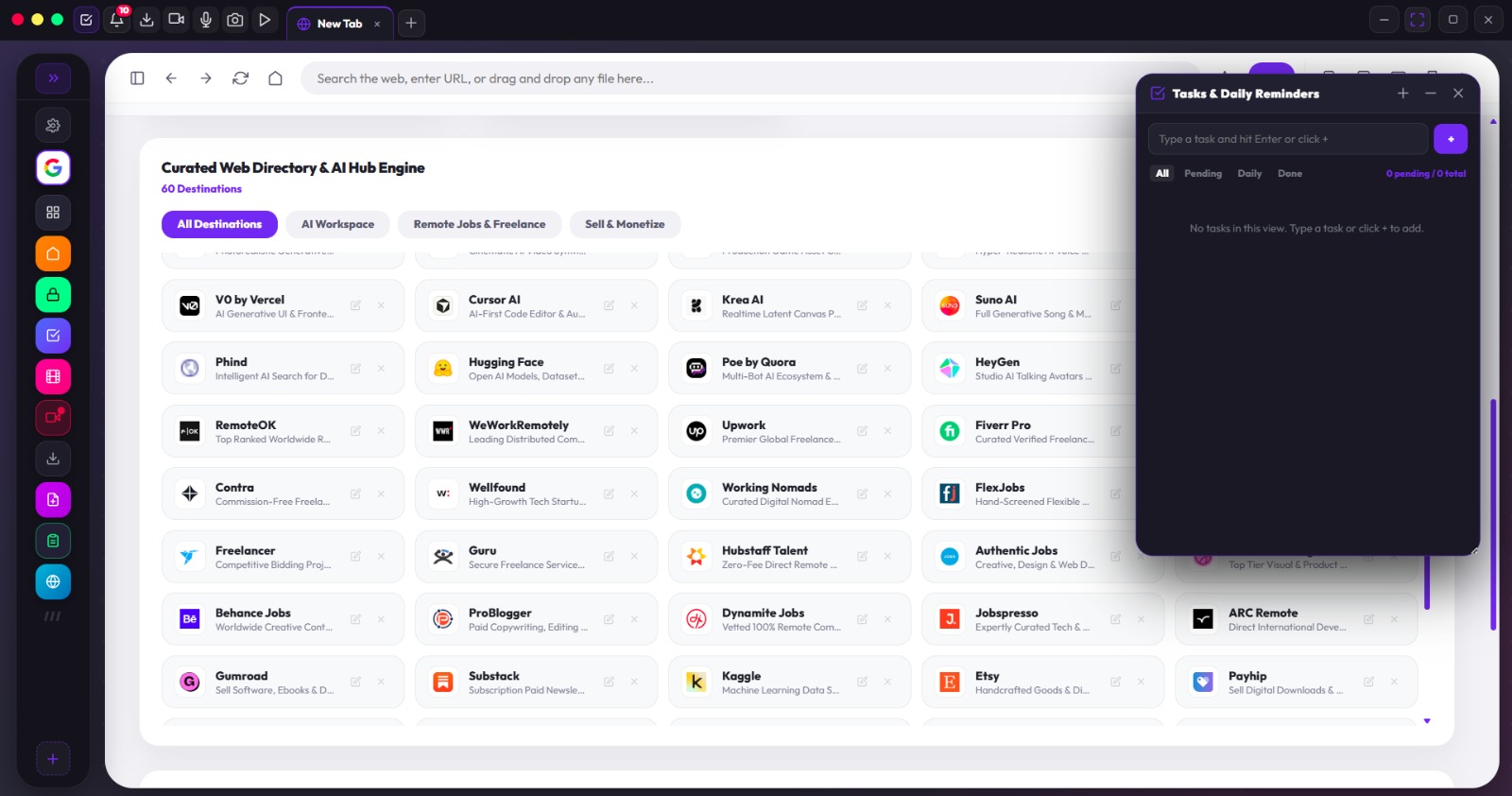
Landscape 1600 × 842
Fullscreen 1 cplanet-main-window.webp
1 cplanet-main-window.webp 1600 × 842 · 183.9 KB · Landscape
Landscape
Guaranteed Anonymity

Nobody Is Watching You.
100% Private Browsing.

You should never feel scared that someone is tracking every tab, link, search query, or credential. CPlanet is built from the bottom up to ensure you are never monitored, never tracked, and your data is never shared.

Your Browser Is Your Private Sanctuary

In CPlanet Browser, your browsing sessions exist solely on your local device. There are zero remote telemetry relays, zero keystroke loggers, and zero hidden tracking profiles. Everything you browse, every account you log into, and every document you edit stays strictly in your hands.

No Remote Monitoring

Nobody is watching what you browse. No third-party network, ISP intercept, or central server monitors your activity inside CPlanet.

Never Shared Anywhere

Your history, passwords, cookies, and local files are never sent to external servers or sold to advertiser networks. Period.

Anti-Fingerprinting Matrix

CPlanet randomizes canvas, audio, and device headers so external trackers cannot create an identity profile of your device.

Native Proxy & Geo Spoofer

Built-in proxy configuration (HTTP/SOCKS5) and geolocation presets shield your real IP address whenever you navigate.

Explicit Content Shield

Harmful & Adult Content Interceptor

CPlanet features an internal filter that drops explicit adult content, predatory popups, gambling mirrors, and malicious cryptojackers at the protocol layer before elements render. SafeSearch is forced across all search engines to keep your work environment clean.

  • Adult domain and explicit keyword rejection
  • Zero leak family and workplace safe mode
  • Hardened tracker and intrusive popunder killer
  • One click cache and credential shredder
Full Feature Inventory

All 159 Native Features

Everything built directly inside CPlanet Browser software without needing third-party extensions.

Document, PDF & File Editing
Features 01 to 35
01Document editor
02DOC and DOCX document opening
03Document content editing
04Bold formatting
05Italic formatting
06Underline formatting
07Bulleted lists
08Document saving
09HTML document export
10Document printing
11PDF viewer
12PDF drawing tool
13PDF highlighting
14PDF text annotations
15PDF annotation clearing
16PDF zoom in
17PDF zoom out
18PDF annotation saving
19PDF export
20PDF printing
21Multi page PDF viewing
22Text file viewer
23Text file editing
24Text file saving
25Text file export
26Local document preview
27Local file opening
28TXT file support
29LOG file support
30JSON file support
31Markdown file support
32JavaScript file support
33Python file support
34CSS file support
35CSV file support
Printing & Document Preview
Features 36 to 43
36Print destination selection
37Print copies selection
38Portrait printing
39Landscape printing
40Document print preview
41Live document preview
42System print dialog
43Print preview page count
Media & Desktop Recording Studio
Features 44 to 65
44Screen and window recording
45Desktop recording
46Browser webview recording
47Display media recording fallback
48Audio recording
49Microphone recording
50System audio recording option
51Screenshot capture
52Full browser screenshot
53Area screenshot selection
54Screenshot capture cancellation
55Screenshot saving
56Recordings library
57Video recordings
58Audio recordings
59Image recordings
60Media preview
61Media file deletion
62Open recordings folder
63Show media file in folder
64Copy media to clipboard
65Recording file size display
Tabs, Windows & Orchestration
Features 66 to 87
66Tab creation
67Tab switching
68Tab closing
69Tab dragging
70Tab tear off into a separate window
71Dynamic tab sizing
72Compact tab display
73Tab favicon display
74Tab title display
75Browser navigation
76Home navigation
77Reload
78Browser history
79History deletion
80Clear all history
81Bookmark management
82Bookmark editing
83Bookmark deletion
84Custom shortcuts
85Shortcut editing
86Shortcut deletion
87Drag and drop file opening
Productivity & Floating Task Manager
Features 88 to 103
88Floating task manager
89Quick task creation
90Detailed task creation
91Task editing
92Task deletion
93Task completion tracking
94Pending task filtering
95Daily task filtering
96Completed task filtering
97Task reminders
98Task date selection
99Task time selection
100Daily task scheduling
101Task notification settings
102Task container minimisation
103Task container dragging
Notifications & Opportunity Feeds
Features 104 to 113
104Notification centre
105Live opportunity alerts
106Notification badges
107Notification clearing
108Notification dropdown
109Toast notifications
110Alert sounds
111Live opportunities refresh
112Remote job listings
113Job website shortcuts
Accounts, Profiles & Encrypted Vault
Features 114 to 129
114Google account integration
115Google account profile
116Google account management
117Google account disconnection
118Saved account credentials
119Saved form details
120Credential searching
121Credential editing
122Credential deletion
123Password visibility toggle
124Username copying
125Password copying
126Website credential auto fill
127Account launching
128Vault accordion
129Saved account management
Proxy, Developer Inspection & App Launcher
Features 130 to 159
130Browser settings manager
131Ad blocking toggle
132Cache clearing
133Default browser status
134Default browser setup
135Turbo mode
136Location changer
137Location presets
138Custom proxy configuration
139Proxy protocol selection
140Proxy host configuration
141Proxy port configuration
142Reset location and proxy
143IP address checking
144Phone viewport simulation
145Tablet viewport simulation
146PC viewport simulation
147Developer inspection console
148Fullscreen Zen tab
149Window maximise and restore
150Window minimise
151Window close
152Installed software listing
153External software scanning
154Software importing
155Software folder reloading
156Software launching
157HTML application launching
158Local application directory support
159Software management sidebar
Official Software Charter

CPlanet Browser Privacy Policy

This policy informs every user that your privacy is safe, your browsing activity is unmonitored, and your data is sovereign.

1. The Zero Monitoring Pledge

When you use CPlanet Browser on PC or Android, no one is watching what you browse. We do not maintain surveillance servers, remote logging queues, or packet tracking scripts. Your searches, web queries, open tabs, and active downloads remain 100% private to your local hardware.

2. Complete Device Isolation & Account Protection

Every account logged in, credential stored, form autofilled, or document viewed inside CPlanet is encrypted and stored locally. CPlanet Browser does not sync your passwords or personal vault to any remote cloud without your explicit manual trigger. Your browser data is never sold, exchanged, or transmitted to advertisers or intelligence collectors.

3. Explicit Content & Malicious Script Neutralization

CPlanet Browser actively screens out NSFW, adult media networks, and intrusive surveillance trackers locally on your device. The filter operates via local pattern matching to keep your browsing environment safe without uploading your DNS history to external third parties.

4. Software Integrity Guarantee

CPlanet Browser is built with a strict commitment to digital liberty and software independence. Updates shipped to PC and Android devices will never inject spyware, hidden analytic payloads, or backdoors.

Available Soon For PC & Android

Get CPlanet When It Drops

CPlanet Browser software is in final optimization for Windows PC and Android devices. Sign up to receive the direct download executable and APK the moment they are compiled.

Windows 10 / 11 (64 bit) Android 8.0+ APK Verified Safe Binary
Developer: Timilehin F.